


Is your Kitchen Aid fridge water tasting a little off? It might be time to replace your fridge filter.
Changing your filter regularly ensures clean, fresh water and ice for you and your family. You might think it’s complicated, but replacing your Kitchen Aid fridge filter is easier than you expect. In this guide, you’ll get simple, step-by-step instructions that anyone can follow.
Keep reading, and you’ll have fresh water flowing in no time.
Signs You Need A New Filter
Knowing when to replace your Kitchen Aid fridge filter can save you from unwanted taste and health issues. Filters don’t last forever, and ignoring the signs can lead to poor water quality or even damage to your appliance. Watch out for these clear signals that your filter needs a swap.
Water Taste And Odor Changes
If your water starts tasting off or smelling strange, it’s a strong hint that the filter is clogged or worn out. You might notice a metallic or musty flavor that wasn’t there before. This happens because the filter no longer traps impurities effectively, letting contaminants slip through.
Have you ever taken a sip and immediately questioned if the water was fresh? That’s your body telling you it’s time for a new filter.
Reduced Water Flow
Is your water dispenser suddenly slower than usual? A clogged filter can restrict water flow, making it take longer to fill your glass or pitcher. This isn’t just inconvenient—it can also stress the fridge’s water system over time.
Try paying attention next time you fill a glass. A noticeable drop in flow speed often means the filter is due for replacement.
Filter Indicator Alerts
Many Kitchen Aid fridges have built-in filter indicator lights or notifications. These alerts are designed to remind you when the filter’s lifespan is ending. Ignoring these signals can lead to reduced water quality and possible appliance issues.
Don’t overlook these warnings. They are simple tools that help you maintain clean, fresh water effortlessly.
Choosing The Right Replacement Filter
Choosing the right replacement filter for your Kitchen Aid fridge is crucial for maintaining water quality and appliance performance. A mismatched filter can lead to poor filtration, leaks, or even damage to your fridge. Knowing which filter fits your model and where to find reliable replacements saves you time and frustration.
Compatible Filter Models
Not all filters work with every Kitchen Aid fridge. Your fridge model number is key to finding a compatible replacement. You can usually find this number on the inside wall of the fridge or on the door frame.
Popular Kitchen Aid filter models include:
- Kitchen Aid 4396841– Fits many side-by-side and bottom-freezer models.
- Kitchen Aid 4396842– Designed for select built-in and compact refrigerators.
- Whirlpool 4396508– Often interchangeable with certain Kitchen Aid models.
Check your fridge’s user manual or the manufacturer’s website to confirm the exact filter type. Using a filter not designed for your model might cause poor water flow or contamination.
Where To Buy Filters
You have several options for buying replacement filters. Authorized dealers and official Kitchen Aid websites provide genuine filters with warranty protection. This can be especially important if you want to avoid counterfeit products.
Other reliable sources include:
- Major online retailers like Amazon and Home Depot, which often have user reviews to help you choose.
- Local appliance stores where you can get advice from staff familiar with Kitchen Aid products.
- Subscription services that deliver filters on a schedule, so you never miss a replacement.
Have you ever bought a filter only to find it didn’t fit or didn’t work as expected? Investing a little effort upfront to verify compatibility and source quality filters pays off in the long run. Your fridge and your health depend on it.
Tools Needed For Replacement
A screwdriver and a replacement filter are essential for this task. Having a towel handy helps catch any water spills. These simple tools make the filter change quick and easy.
Replacing the Kitchen Aid fridge filter is a simple process. With the right tools, it becomes even easier. Having everything ready before starting ensures a smooth replacement. Below, find the essential tools you need.
Basic Tools For Kitchen Aid Fridge Filter Replacement
You don’t need many tools. A few basic items will do. Most are likely in your home already. Here’s a list:
- New fridge filter: Make sure it matches your fridge model.
- Soft cloth or towel: Useful for catching any drips.
- Small bowl or container: To hold any excess water.
Optional Tools For A Quick Replacement
Some tools can make the job easier. They’re not necessary, but helpful.
- Flashlight: Useful if your kitchen is not well-lit.
- Gloves: Keep your hands clean and dry.
- Owner’s manual: For quick reference if needed.
Gather these tools before starting. They save time and effort during the process.
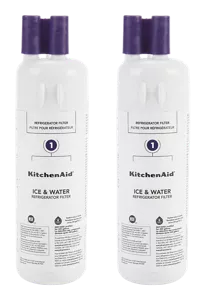
Credit: www.kitchenaid.com
Step-by-step Filter Removal
Replacing your Kitchen Aid fridge filter doesn’t have to be a hassle. Taking it one step at a time makes the process straightforward and quick. Let’s break down the key actions to get your filter out and ready for a new one.
Locating The Filter
First, find where the filter sits inside your fridge. Most Kitchen Aid models have the filter in the upper right corner or inside the fresh food compartment. Check your user manual or look for a round or rectangular cover that snaps or twists off.
Did you know some filters hide behind a small door or panel? If you can’t spot it right away, gently feel around the sides and top of the fridge’s interior. Knowing exactly where it is saves you time and frustration later.
Turning Off The Water Supply
Before you pull out the filter, turn off the water supply to avoid leaks or spills. The valve is usually under the kitchen sink or behind the fridge. Turn it clockwise until it stops.
Have you noticed any dripping or leaking before? This is the moment to prevent any mess. Turning off the water keeps your kitchen dry and clean while you work on the filter.
Removing The Old Filter
Once the water is off, it’s time to remove the old filter. Most Kitchen Aid filters twist counterclockwise or push in and pull out. Don’t force it; if it feels stuck, wiggle it gently to loosen.
- Grab a towel to catch any water drips.
- Turn or pull the filter according to your model’s design.
- Dispose of the old filter safely.
Have you ever struggled with a stuck filter? Patience is key. Taking your time prevents damage to the filter housing and ensures a smooth replacement.
Installing The New Filter
Installing the new filter in your Kitchen Aid fridge is a simple task that keeps your water fresh and clean. Follow these steps to ensure the filter fits correctly and works well. Proper installation avoids leaks and maintains the fridge’s performance.
Preparing The New Filter
Remove the new filter from its packaging carefully. Check for any protective caps or seals on the filter. Remove these caps before installation. Clean your hands to avoid dirt or oils on the filter. Make sure the filter matches your fridge model for a perfect fit.
Inserting And Securing
Locate the filter slot inside your fridge. Align the new filter with the slot’s shape. Push the filter gently but firmly into place. Turn the filter clockwise until it locks. You will hear a click sound when it is secure. Avoid forcing the filter to prevent damage.
Resetting The Filter Indicator
Your fridge has a filter indicator light to track filter life. After installing the new filter, reset this light. Press and hold the reset button on the fridge display. Hold for about 3 seconds until the light turns off. This step helps track when the next filter change is due.

Credit: www.searshomeservices.com
Flushing The New Filter
Flushing the new Kitchen Aid fridge filter is a crucial step that often gets overlooked. It clears out any loose carbon particles and air trapped inside the filter, ensuring your water tastes fresh and clean right away. Skipping this step can result in cloudy water or an odd taste that makes you question the filter’s effectiveness.
Why Flushing Is Important
Flushing removes manufacturing debris and trapped air inside the filter. Without it, you might notice small black specks or bubbles in your water. These are harmless but can be off-putting and make you think your water is contaminated.
Additionally, flushing helps the filter settle into your fridge’s water system. It allows water to flow smoothly through the new filter, which improves filtration and water pressure. Think of it as prepping your filter to perform at its best right from the start.
How To Flush Properly
Start by locating the water dispenser or the ice maker outlet on your fridge. Run cold water through the dispenser for about 3 to 5 minutes. This usually means letting about 2 to 3 gallons of water flow through the new filter.
If your fridge doesn’t have a water dispenser, fill a large container directly from the water line connected to the filter. Dispose of this water since it might contain carbon dust. Keep an eye on the water flow; if it slows down, double-check the filter installation.
- Use a clean glass or container to catch the flushed water.
- Flush in short bursts if your filter or fridge manual suggests it.
- Check for any leaks or unusual noises during flushing.
Have you noticed a difference in water taste or ice clarity after flushing your filter? Many users report a noticeable improvement, which proves that this simple step really matters.
Troubleshooting Common Issues
Replacing your Kitchen Aid fridge filter usually goes smoothly, but sometimes unexpected issues pop up. Knowing how to troubleshoot common problems can save you time and frustration. Let’s look at some typical hiccups you might face and how to fix them quickly.
Leaks After Installation
If you notice water leaking after installing the filter, it’s often due to improper seating or a damaged O-ring. Double-check that the filter is pushed in firmly until it clicks into place. Inspect the O-ring for cracks or wear; replacing it can stop leaks instantly.
Have you ever tightened the filter and still seen water pooling? Sometimes debris or dirt inside the filter housing prevents a tight seal. Wipe the area clean with a soft cloth before reinstalling the filter to ensure a snug fit.
Water Flow Problems
Slow or no water flow after replacing the filter can signal a clogged filter or trapped air in the system. Try running water through the dispenser for a few minutes to clear air bubbles. If flow remains weak, the filter might be defective or installed backward—check the arrow on the filter for correct direction.
Think about the last time you replaced your filter—did you flush it properly? Flushing the filter removes loose carbon particles that can block water flow. Without flushing, you could be left with a frustratingly slow drip instead of a steady stream.
Filter Indicator Not Resetting
Sometimes, the filter indicator light won’t reset after you install a new filter. This usually happens if you forget to reset it manually or if the fridge needs a power cycle. Check your fridge’s manual for the exact reset procedure, which often involves pressing and holding a button for several seconds.
Have you tried unplugging the fridge for a minute? A quick power reset can sometimes fix electronic glitches, including stubborn indicator lights. If the light still stays on, the sensor or control board might need professional attention.
Maintaining Your Fridge Filter
Maintaining your Kitchen Aid fridge filter keeps your water clean and tasting fresh. A well-kept filter helps avoid clogs and bad odors. It also protects the fridge’s water system and ensures safe drinking water. Simple care steps extend the filter’s life and save money.
Regular Replacement Schedule
Replace the fridge filter every six months. Some models may need changes sooner. Check the user manual for exact times. A sticker on the fridge can remind you. Changing the filter on time prevents dirt buildup. Old filters reduce water flow and taste quality.
Tips For Longer Filter Life
- Run cold water regularly to keep the filter clean.
- Avoid using hot water through the filter.
- Keep the fridge temperature steady to reduce strain.
- Clean the filter housing when changing the filter.
- Use only genuine Kitchen Aid replacement filters.
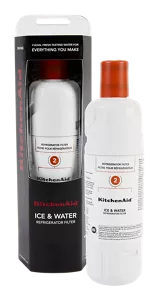
Credit: www.kitchenaid.com
Frequently Asked Questions
How Do I Know When To Replace My Kitchen Aid Fridge Filter?
Replace the filter every 6 months or when water tastes off. Check your fridge’s indicator light for filter status. Regular replacement ensures clean water and better ice quality.
What Tools Are Needed To Replace Kitchen Aid Fridge Filters?
No special tools are needed. Most filters twist out by hand. Simply turn the old filter counterclockwise and insert the new one clockwise until secure.
Can I Use Any Filter For My Kitchen Aid Fridge?
No, use only filters compatible with your Kitchen Aid model. Using the wrong filter can cause leaks or poor water quality. Check your fridge manual or filter packaging for compatibility.
How To Reset The Filter Indicator After Replacement?
Press and hold the reset button on the fridge’s control panel for 3 seconds. The indicator light will turn off. This helps track the next replacement time.
Conclusion
Replacing your Kitchen Aid fridge filter keeps water clean and fresh. It takes just a few easy steps to do. Regular changes improve taste and protect your health. Don’t wait until the water tastes bad or slows down. A simple filter swap helps your fridge work better.
Keep track of the filter’s life to avoid problems. Clean water means better drinks and food every day. This small task saves you money and worry in the long run. Stay on top of filter changes for best results.


