


Kitchenaid Refrigerator
Is your KitchenAid refrigerator water filter not working like it should? You rely on clean, fresh water every day, and a faulty filter can be frustrating.
But don’t worry—you don’t have to call a technician right away. With a few simple steps, you can troubleshoot the problem yourself and get your water tasting great again. Keep reading, and you’ll learn easy ways to fix common filter issues quickly and confidently.
Your perfect glass of water is just a few minutes away.
Common Water Filter Issues
Water filters in your Kitchenaid refrigerator play a crucial role in ensuring clean and fresh-tasting water. However, they can sometimes cause issues that affect performance. Recognizing common water filter problems early helps you avoid inconvenience and keeps your water quality high.
Water Flow Problems
Have you noticed your water flowing slower than usual or stopping altogether? This often happens when the filter is clogged with impurities or installed incorrectly. Make sure the filter is properly seated and not past its replacement date.
If the flow is still weak, check for air trapped in the system by dispensing water for a few minutes. Sometimes, replacing the filter is the only fix, especially if it has been used beyond its recommended lifespan.
Strange Tastes And Odors
Unpleasant tastes or smells from your water can be a sign that the filter isn’t working right. It might be saturated with contaminants or could have been exposed to freezing temperatures. Always use genuine Kitchenaid filters designed for your model to avoid these issues.
Have you ever tasted water that smells like plastic or chemicals? This might indicate a new filter needs rinsing before use. Run several glasses of water through the filter right after installation to clear out any manufacturing residues.
Filter Indicator Light
The filter indicator light is your fridge’s way of reminding you to change the filter. If the light stays on even after replacing the filter, you might need to reset it manually. Check your fridge’s manual for the reset process specific to your model.
Sometimes, the indicator light can malfunction due to electrical issues or sensor problems. If resetting doesn’t work, consider contacting Kitchenaid support for further troubleshooting. Don’t ignore the light; it’s there to help maintain your water quality.
Basic Troubleshooting Steps
Experiencing issues with your Kitchenaid refrigerator water filter can be frustrating, but some basic troubleshooting steps often fix common problems quickly. These steps help you identify whether the issue is with the filter itself, its installation, or the water supply. Taking a systematic approach saves you time and avoids unnecessary replacements.
Checking Filter Installation
Start by inspecting how the filter is installed. A filter that’s not seated properly can block water flow or cause leaks.
- Remove the filter by twisting it counterclockwise and pull it out gently.
- Examine the O-ring to ensure it’s intact and clean. A damaged or misplaced O-ring can prevent a good seal.
- Reinsert the filter firmly and twist clockwise until it clicks into place.
Have you ever struggled with a filter that seemed fine but just wouldn’t fit correctly? Often, a little extra pressure or realigning the filter solves the problem instantly.
Resetting The Filter Indicator
Your refrigerator has a filter indicator light that reminds you when to replace the filter. Sometimes, this light stays on even after installing a new filter.
- Locate the filter reset button on your control panel.
- Press and hold the button for about 3 to 5 seconds until the light turns off.
- If your model doesn’t have a reset button, check the manual for instructions to reset via control panel settings.
Resetting the indicator doesn’t improve water flow directly, but it stops false alarms and helps you track the filter’s lifespan correctly.
Inspecting Water Supply
Water flow issues often stem from the supply line rather than the filter. Check if water is reaching the refrigerator properly.
- Look for kinks or bends in the water supply line behind the fridge.
- Make sure the water valve connected to the refrigerator is fully open.
- Test the water pressure by running water from a nearby faucet connected to the same supply.
If the water pressure seems weak, it might cause slow filtration or no water at all. Could your home’s plumbing setup be affecting your fridge’s water supply?
Replacing The Water Filter
Replacing the water filter in your KitchenAid refrigerator keeps your water fresh and clean. A new filter improves taste and removes impurities. Regular replacement prevents clogging and maintains water flow. Knowing how to replace the filter saves time and effort.
Choosing The Right Filter
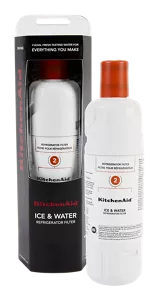
Use a filter made for KitchenAid refrigerators only. Check the model number on your fridge or old filter. Look for filters certified to remove contaminants like chlorine and lead. Using the correct filter ensures proper fit and water quality. Avoid generic filters that may damage your fridge or reduce filtration.
Step-by-step Replacement Guide
- Locate the water filter inside the fridge, usually in the upper right corner or grille.
- Turn the filter counterclockwise to unlock it. Pull it out gently.
- Remove the protective cap from the new filter.
- Align the new filter with the slot and push it in until it clicks.
- Turn the filter clockwise to lock it in place.
- Run water for a few minutes to flush air and impurities.
- Reset the filter indicator light on your fridge control panel.

Credit: www.sloanappliance.com
Advanced Fixes
Check the water filter for clogs or damage to restore proper flow. Reset the filter indicator after replacement to ensure accurate alerts. Clean the filter housing to remove any buildup that may block water.
If your KitchenAid refrigerator water filter isn’t working as expected, it might be time to dive into some advanced fixes. These solutions are perfect for those comfortable with basic DIY skills and can save you a call to the technician. Let’s explore some practical ways to get your water filter back on track.
Clearing Water Line Blockages
Sometimes, a blockage in the water line can cause reduced flow or even stop it altogether. To tackle this, start by turning off the water supply to your refrigerator. Disconnect the water line and inspect it for any visible obstructions. Gently flush the line with warm water to dislodge any debris. You might be surprised at what could be causing the blockage—tiny bits of sediment are often the culprits. Once cleared, reconnect the line and turn the water supply back on, checking for a steady flow.
Testing Water Pressure
Low water pressure can affect the performance of your filter. To test it, use a water pressure gauge on the supply line to ensure it falls within the recommended range—usually between 40 and 120 psi. If the pressure is too low, check for kinks in the water line or issues with the water supply valve. Sometimes, simply adjusting the valve can make a noticeable difference. Wouldn’t it be great if a small tweak could solve your big problem?
Examining The Dispenser Valve
The dispenser valve controls the flow of water into your refrigerator. A malfunctioning valve might cause irregular water flow or none at all. Carefully remove the valve and inspect it for any signs of wear or damage. If the valve is faulty, replacing it might be the best option. Ensuring the valve is in top shape can lead to smoother operation and peace of mind. After all, who doesn’t love a problem-free refrigerator? These advanced fixes can often solve persistent issues with your KitchenAid refrigerator water filter. What steps will you take first to ensure your filter is running perfectly?
When To Contact Support
Knowing when to contact support for your Kitchenaid refrigerator water filter saves time and avoids damage. Some problems require professional help beyond basic troubleshooting. Early support contact can prevent bigger issues and keep your appliance running smoothly.
Signs Of Mechanical Failure
- Water leaks near the filter area
- Water flow stops or slows drastically
- Filter won’t lock or fit properly
- Strange noises from the filter housing
- Repeated error messages or filter alerts
These signs show mechanical problems that you cannot fix easily. Contact support to avoid worsening the issue.
Warranty And Service Options
Kitchenaid refrigerators often come with a warranty covering water filter parts. Check your warranty details for coverage period and conditions.
Support services may include:
- Authorized repairs by certified technicians
- Replacement parts at no or low cost
- Guidance for safe filter replacement
Contacting support helps you use warranty benefits and get professional repairs. It ensures your refrigerator remains in good condition.
Credit: www.kitchenaid.com
Credit: www.kitchenaid.com
Frequently Asked Questions
How Do I Reset My Kitchenaid Refrigerator Water Filter?
To reset, press and hold the water filter reset button for 3 seconds. The indicator light will turn green, confirming the reset. This helps track filter usage and maintains water quality.
Why Is My Kitchenaid Water Filter Not Dispensing Water?
Check for a clogged or improperly installed filter. Ensure the filter is seated correctly and replace it if over six months old. Also, inspect the water supply line for any kinks or blockages.
How Often Should I Replace The Kitchenaid Water Filter?
Replace the filter every six months or after filtering 200 gallons. Regular replacement ensures clean water and optimal refrigerator performance. Delaying replacement can cause clogging and reduce water flow.
What Causes A Water Filter Error On Kitchenaid Fridge?
A water filter error usually means the filter is expired, missing, or improperly installed. Reset the filter indicator after installing a new one. If the error persists, inspect for sensor or connection issues.
Conclusion
Troubleshooting your Kitchenaid refrigerator water filter can save time and money. Start with simple checks like filter installation and water flow. Regular filter changes keep water clean and fresh. Watch for leaks or unusual tastes. Small fixes often solve common problems quickly.
Keep your fridge running smoothly with basic care. Now, you can enjoy fresh water without hassle. Stay patient and follow these easy steps for best results.


